> ## Documentation Index
> Fetch the complete documentation index at: https://docs.loadforge.com/llms.txt
> Use this file to discover all available pages before exploring further.
# User Experience
> How are real users experiencing your site?
Once a host is verified, LoadForge will automatically monitor its **CrUX data**—live readings from Chrome browsers that reflect real user experience metrics.
## About CrUX
The **Chrome User Experience Report (CrUX)** collects anonymized, real-world performance data from Chrome users visiting your website. This dataset provides insights into how real users experience your site, highlighting potential bottlenecks and areas for improvement.
## HTTP/S Performance Metrics
TTFB under 200ms is considered excellent. If your TTFB is consistently above 500ms, consider implementing caching, optimizing database queries, or upgrading your server resources.
For HTTP/S performance, we primarily focus on **TTFB (Time to First Byte)** and **FCP (First Contentful Paint)**. These metrics measure how quickly your site starts displaying content to users and are directly tied to the performance of your backend infrastructure.
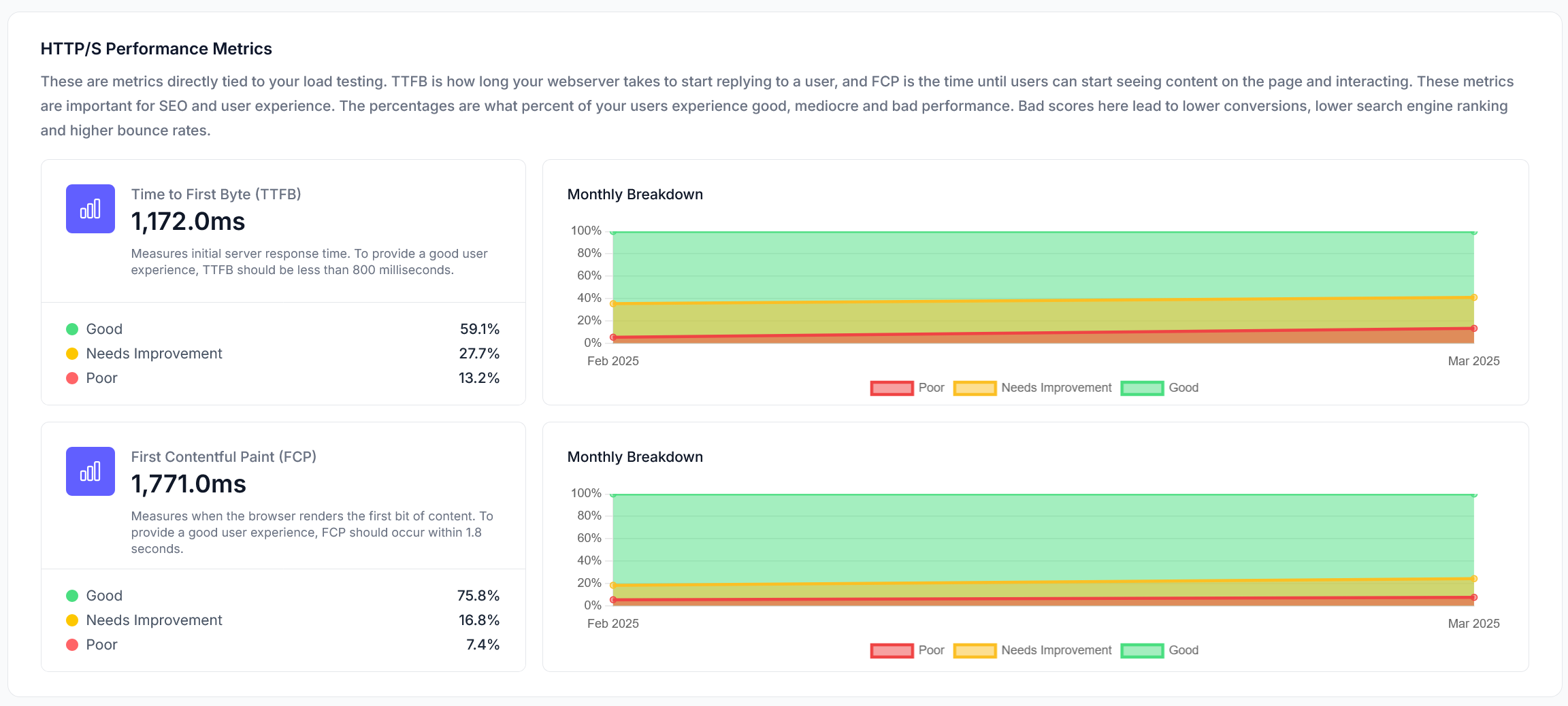 * **TTFB (Time to First Byte)**: Measures the delay before a user receives the first byte from your server.
* **FCP (First Contentful Paint)**: Indicates when the first visible element of your site appears to users.
Optimizing these metrics ensures a **fast and responsive** experience for your users, improving engagement and satisfaction.
## Web Performance Metrics
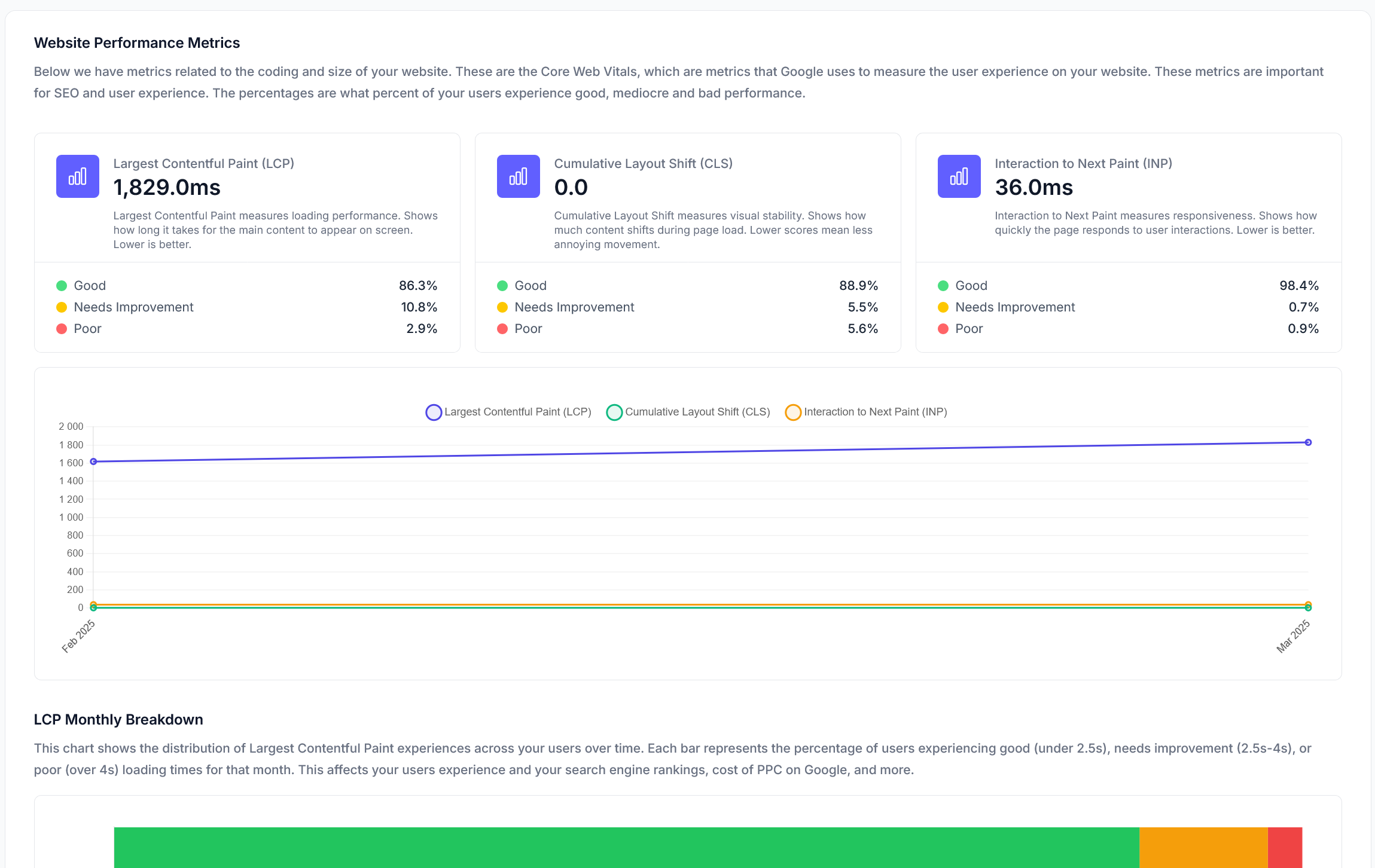
Web performance metrics relate to the front-end experience of your site, including layout shifts, interaction delays, and overall smoothness. These factors influence how **snappy and fluid** your website feels after it has loaded.
* **TTFB (Time to First Byte)**: Measures the delay before a user receives the first byte from your server.
* **FCP (First Contentful Paint)**: Indicates when the first visible element of your site appears to users.
Optimizing these metrics ensures a **fast and responsive** experience for your users, improving engagement and satisfaction.
## Web Performance Metrics
Web performance metrics relate to the front-end experience of your site, including layout shifts, interaction delays, and overall smoothness. These factors influence how **snappy and fluid** your website feels after it has loaded.
 Key metrics include:
* **CLS (Cumulative Layout Shift)**: Measures unexpected page movement, which can be frustrating for users.
* **INP (Interaction to Next Paint)**: Evaluates responsiveness by measuring interaction delays.
* **LCP (Largest Contentful Paint)**: Tracks the loading time of the largest visible element.
Improving these metrics enhances **user experience, engagement, and conversion rates**.
## Graphing Over Time
LoadForge stores and tracks these results **each month**, allowing you to monitor real user experience trends over time. This enables you to:
* **Compare performance improvements** after optimization efforts.
* **Identify seasonal traffic changes** that may impact performance.
* **Detect regressions** after updates or infrastructure changes.
## Why These Metrics Matter
These performance indicators are **crucial** for both **SEO rankings** and **user experience**.
* **SEO Impact**: Google prioritizes fast, user-friendly websites in search rankings. Poor performance can lower your visibility in search results.
* **User Experience**: A faster, more responsive website leads to **higher engagement, lower bounce rates, and increased conversions**.
By regularly monitoring and optimizing these metrics, you ensure that your website provides an optimal experience for users while maintaining strong SEO performance.
Learn how LoadForge monitors your host's uptime and response times
Explore our comprehensive performance monitoring suite
CrUX metrics are now part of our new [Performance Monitoring](/performance/overview) section. For detailed CrUX analysis, visit the [Core Web Vitals](/performance/crux-metrics) page.
Key metrics include:
* **CLS (Cumulative Layout Shift)**: Measures unexpected page movement, which can be frustrating for users.
* **INP (Interaction to Next Paint)**: Evaluates responsiveness by measuring interaction delays.
* **LCP (Largest Contentful Paint)**: Tracks the loading time of the largest visible element.
Improving these metrics enhances **user experience, engagement, and conversion rates**.
## Graphing Over Time
LoadForge stores and tracks these results **each month**, allowing you to monitor real user experience trends over time. This enables you to:
* **Compare performance improvements** after optimization efforts.
* **Identify seasonal traffic changes** that may impact performance.
* **Detect regressions** after updates or infrastructure changes.
## Why These Metrics Matter
These performance indicators are **crucial** for both **SEO rankings** and **user experience**.
* **SEO Impact**: Google prioritizes fast, user-friendly websites in search rankings. Poor performance can lower your visibility in search results.
* **User Experience**: A faster, more responsive website leads to **higher engagement, lower bounce rates, and increased conversions**.
By regularly monitoring and optimizing these metrics, you ensure that your website provides an optimal experience for users while maintaining strong SEO performance.
Learn how LoadForge monitors your host's uptime and response times
Explore our comprehensive performance monitoring suite
CrUX metrics are now part of our new [Performance Monitoring](/performance/overview) section. For detailed CrUX analysis, visit the [Core Web Vitals](/performance/crux-metrics) page.