> ## Documentation Index
> Fetch the complete documentation index at: https://docs.loadforge.com/llms.txt
> Use this file to discover all available pages before exploring further.
# GitHub integration (Simple)
> Effortlessly launch load tests from GitHub actions.
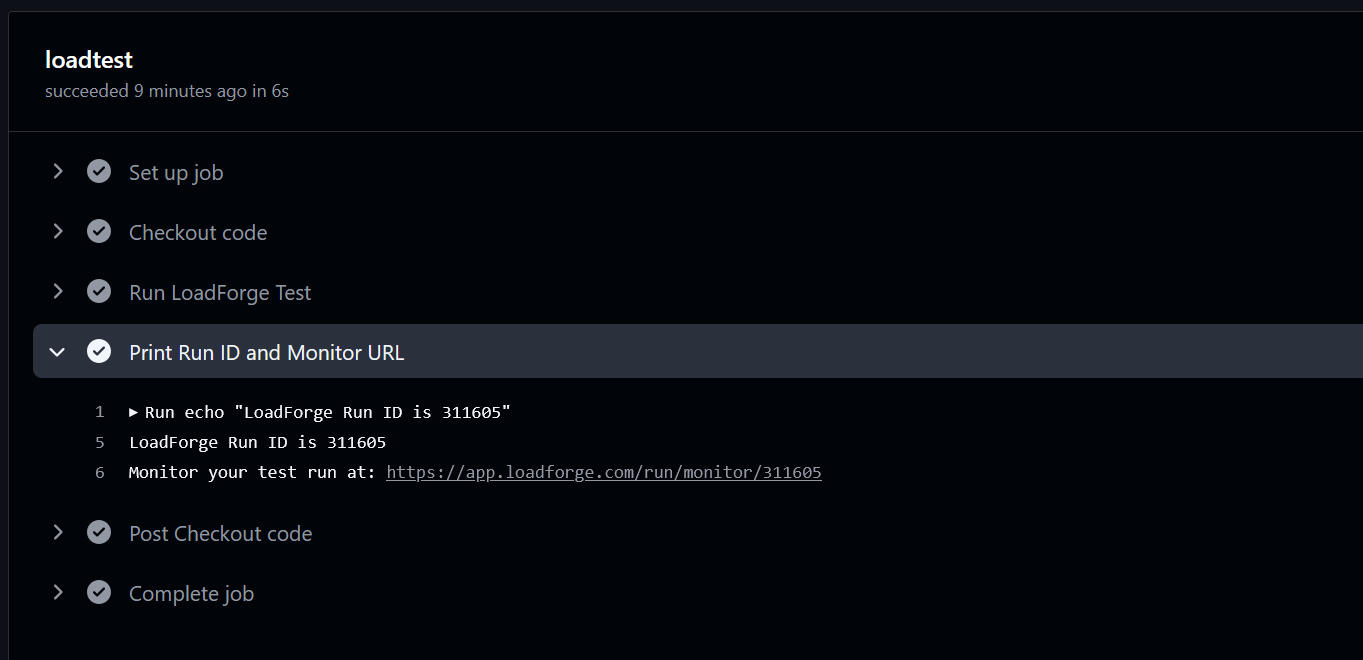
The LoadForge GitHub action allows you to launch load tests directly from GitHub actions. You then
receive an email and optionally Slack notifications, Zapier notifications, Datadog tracking, etc.
as the Run completes.
 ***
## GitHub Actions Integration
LoadForge provides an official GitHub Action that allows you to trigger load tests directly from your GitHub Actions workflow. This integration makes it easy to incorporate performance testing into your CI/CD pipeline.
## Setting Up the GitHub Action
To use the LoadForge GitHub Action in your workflow:
1. **Get Your LoadForge API Token**:\
Log into your LoadForge account and navigate to the API section to retrieve your API token.
2. **Add the API Token to GitHub Secrets**:\
In your GitHub repository, go to Settings > Secrets and add your LoadForge API token as `LOADFORGE_API_TOKEN`.
3. **Create a Workflow File**:\
Create a `.github/workflows/loadforge.yml` file in your repository with the following content:
```yaml theme={null}
name: Performance Testing
on:
push:
branches: [ main ]
pull_request:
branches: [ main ]
jobs:
loadtest:
runs-on: ubuntu-latest
steps:
- name: Checkout code
uses: actions/checkout@v4
- name: Deploy to staging
# Your deployment step here
- name: Run LoadForge Test
id: loadforge
uses: AdventDevInc/run-lf-action@v1
with:
api-token: ${{ secrets.LOADFORGE_API_TOKEN }}
test-id: 123
duration: 10
- name: Print Run ID and Monitor URL
run: |
echo "LoadForge Run ID is ${{ steps.loadforge.outputs.run_id }}"
echo "Monitor your test run at: ${{ steps.loadforge.outputs.monitor_url }}"
```
## GitHub Action Parameters
### Inputs
| Name | Description | Required | Default |
| ----------- | ------------------------------------------- | -------- | ------- |
| `api-token` | Your LoadForge API Token | Yes | N/A |
| `test-id` | The ID of the LoadForge test to trigger | Yes | N/A |
| `duration` | Duration of the test run in minutes (2-720) | No | 5 |
### Outputs
| Name | Description |
| ------------- | ------------------------------------------------------------------------------------------------------------------------------------------ |
| `run_id` | The ID of the created LoadForge run |
| `monitor_url` | The URL to monitor the LoadForge run ([https://app.loadforge.com/run/monitor/\{run\_id}](https://app.loadforge.com/run/monitor/\{run_id})) |
## Use Cases for GitHub Actions Integration
1. **Continuous Performance Testing**:\
Automatically run load tests on every push to your main branch to catch performance regressions early.
2. **Pre-Release Testing**:\
Include performance tests in your release workflow to ensure your application meets performance requirements before release.
3. **Pull Request Validation**:\
Run load tests on pull requests to ensure that new code changes don't negatively impact performance.
4. **Scheduled Performance Monitoring**:\
Set up scheduled workflows to run load tests at regular intervals to monitor your application's performance over time.
***
## Conclusion
The LoadForge GitHub Action streamlines your performance testing workflow by integrating directly with your CI/CD pipeline. By incorporating load testing into your GitHub Actions workflow, you can ensure that performance testing becomes a regular part of your development process, helping you catch and address performance issues before they reach production.
***
## GitHub Actions Integration
LoadForge provides an official GitHub Action that allows you to trigger load tests directly from your GitHub Actions workflow. This integration makes it easy to incorporate performance testing into your CI/CD pipeline.
## Setting Up the GitHub Action
To use the LoadForge GitHub Action in your workflow:
1. **Get Your LoadForge API Token**:\
Log into your LoadForge account and navigate to the API section to retrieve your API token.
2. **Add the API Token to GitHub Secrets**:\
In your GitHub repository, go to Settings > Secrets and add your LoadForge API token as `LOADFORGE_API_TOKEN`.
3. **Create a Workflow File**:\
Create a `.github/workflows/loadforge.yml` file in your repository with the following content:
```yaml theme={null}
name: Performance Testing
on:
push:
branches: [ main ]
pull_request:
branches: [ main ]
jobs:
loadtest:
runs-on: ubuntu-latest
steps:
- name: Checkout code
uses: actions/checkout@v4
- name: Deploy to staging
# Your deployment step here
- name: Run LoadForge Test
id: loadforge
uses: AdventDevInc/run-lf-action@v1
with:
api-token: ${{ secrets.LOADFORGE_API_TOKEN }}
test-id: 123
duration: 10
- name: Print Run ID and Monitor URL
run: |
echo "LoadForge Run ID is ${{ steps.loadforge.outputs.run_id }}"
echo "Monitor your test run at: ${{ steps.loadforge.outputs.monitor_url }}"
```
## GitHub Action Parameters
### Inputs
| Name | Description | Required | Default |
| ----------- | ------------------------------------------- | -------- | ------- |
| `api-token` | Your LoadForge API Token | Yes | N/A |
| `test-id` | The ID of the LoadForge test to trigger | Yes | N/A |
| `duration` | Duration of the test run in minutes (2-720) | No | 5 |
### Outputs
| Name | Description |
| ------------- | ------------------------------------------------------------------------------------------------------------------------------------------ |
| `run_id` | The ID of the created LoadForge run |
| `monitor_url` | The URL to monitor the LoadForge run ([https://app.loadforge.com/run/monitor/\{run\_id}](https://app.loadforge.com/run/monitor/\{run_id})) |
## Use Cases for GitHub Actions Integration
1. **Continuous Performance Testing**:\
Automatically run load tests on every push to your main branch to catch performance regressions early.
2. **Pre-Release Testing**:\
Include performance tests in your release workflow to ensure your application meets performance requirements before release.
3. **Pull Request Validation**:\
Run load tests on pull requests to ensure that new code changes don't negatively impact performance.
4. **Scheduled Performance Monitoring**:\
Set up scheduled workflows to run load tests at regular intervals to monitor your application's performance over time.
***
## Conclusion
The LoadForge GitHub Action streamlines your performance testing workflow by integrating directly with your CI/CD pipeline. By incorporating load testing into your GitHub Actions workflow, you can ensure that performance testing becomes a regular part of your development process, helping you catch and address performance issues before they reach production.