> ## Documentation Index
> Fetch the complete documentation index at: https://docs.loadforge.com/llms.txt
> Use this file to discover all available pages before exploring further.
# File Management
> Upload and use data files in your load tests
LoadForge allows you to upload, create, and manage files for your load tests. You can upload CSV, JSON, or TXT files (maximum 5MB) to use in your test scripts.
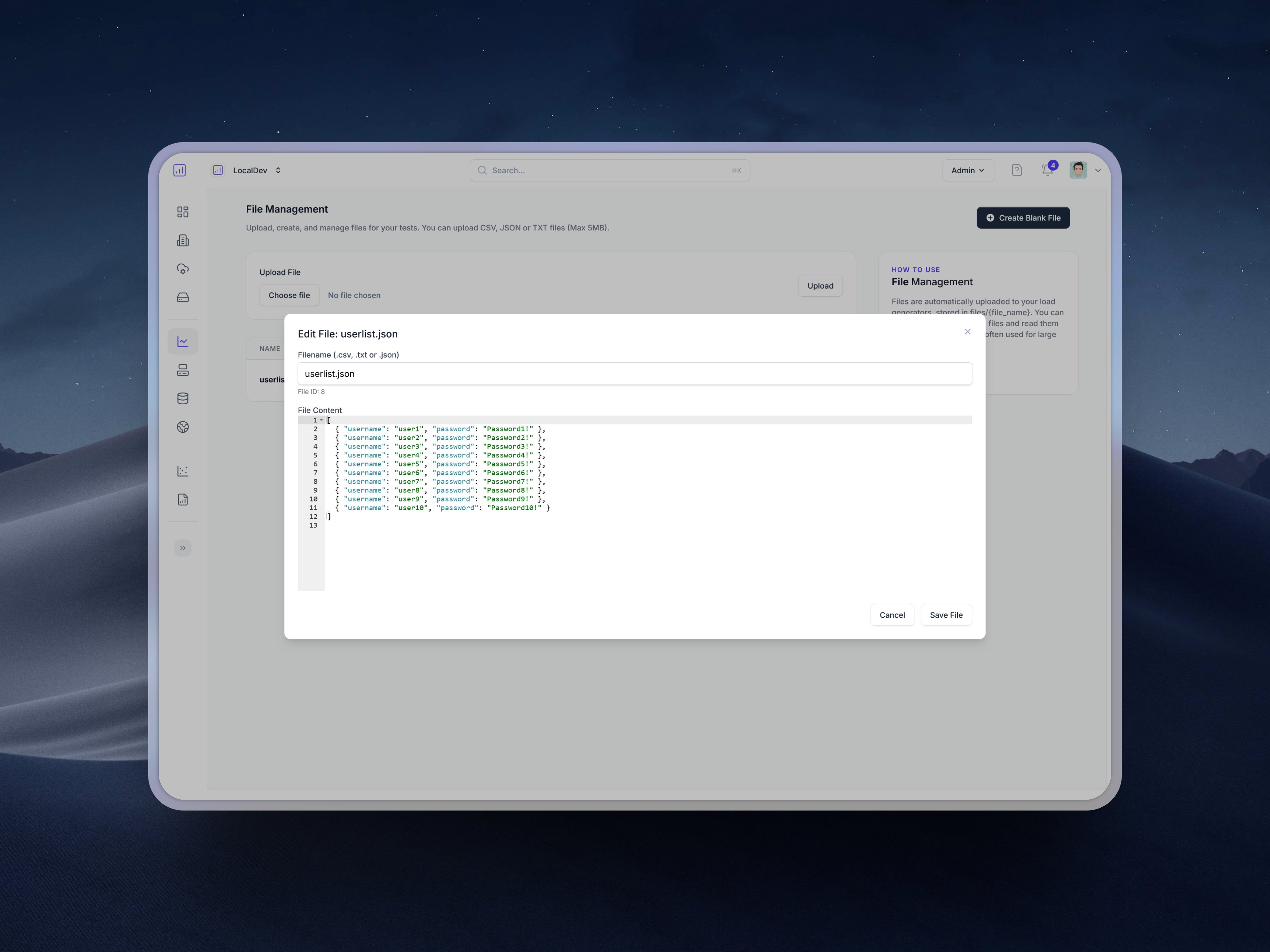 ## How Files Work in LoadForge
Files are automatically uploaded to your load generators and stored in the `files/{file_name}` directory. This makes it easy to access your data files from within your load test scripts. This feature is particularly useful for:
* Large user lists for authentication testing
* Test datasets for API or form submissions
* Configuration files for complex test scenarios
* CSV data for data-driven testing
## Uploading Files
You can upload files through the LoadForge interface:
1. Navigate to the **File Management** section
2. Click **Upload File** or **Create Blank File**
3. Select your file or create a new one
4. The file will be available in the `files/` directory on all load generators
Name the file correctly to get better editing capabilities. For example, .csv files load a CSV editor.
## Using Files in Locust Tests
Here are some examples of how to use uploaded files in your Locust test scripts:
### Loading a JSON User List
```python theme={null}
import json
import random
from locust import HttpUser, task, between
class UserBehavior(HttpUser):
wait_time = between(1, 5)
def on_start(self):
# Load the user credentials from the uploaded JSON file
with open('files/userlist.json', 'r') as f:
self.users = json.load(f)
# Select a random user from the list
user_data = random.choice(self.users)
self.username = user_data['username']
self.password = user_data['password']
# Log in with the selected user
self.client.post("/login", {
"username": self.username,
"password": self.password
})
@task
def view_dashboard(self):
self.client.get("/dashboard")
```
Example `userlist.json` file:
```json theme={null}
[
{"username": "user1", "password": "pass1"},
{"username": "user2", "password": "pass2"},
{"username": "user3", "password": "pass3"}
]
```
### Reading CSV Data for Test Scenarios
```python theme={null}
import csv
import random
from locust import HttpUser, task, between
class DataDrivenUser(HttpUser):
wait_time = between(1, 3)
def on_start(self):
# Load test data from CSV file
self.test_data = []
with open('files/test_data.csv', 'r') as f:
reader = csv.DictReader(f)
for row in reader:
self.test_data.append(row)
@task
def submit_form(self):
# Pick a random data row for this request
data = random.choice(self.test_data)
# Use the data in a POST request
self.client.post("/api/submit", {
"name": data['name'],
"email": data['email'],
"message": data['message']
})
```
### Using a Configuration File
```python theme={null}
import json
from locust import HttpUser, task, between
class ConfigDrivenUser(HttpUser):
wait_time = between(1, 5)
def on_start(self):
# Load configuration from JSON file
with open('files/config.json', 'r') as f:
self.config = json.load(f)
# Set up the test based on configuration
self.api_endpoints = self.config['endpoints']
self.headers = self.config['headers']
@task
def call_api(self):
for endpoint in self.api_endpoints:
self.client.get(
endpoint['url'],
headers=self.headers,
name=endpoint['name']
)
```
## Best Practices
* **File Size**: Keep files under 5MB for optimal performance
* **File Format**: Use structured formats like JSON or CSV for easy parsing
* **Error Handling**: Always include error handling when reading files
* **Caching**: Load files once during startup rather than for each request
* **Random Selection**: For user credentials, randomly select from a large pool to simulate realistic behavior
## Need Further Assistance?
If you have questions about using files in your load tests or need help with a specific implementation, don't hesitate to contact us. We're here to help you get the most out of LoadForge.
## How Files Work in LoadForge
Files are automatically uploaded to your load generators and stored in the `files/{file_name}` directory. This makes it easy to access your data files from within your load test scripts. This feature is particularly useful for:
* Large user lists for authentication testing
* Test datasets for API or form submissions
* Configuration files for complex test scenarios
* CSV data for data-driven testing
## Uploading Files
You can upload files through the LoadForge interface:
1. Navigate to the **File Management** section
2. Click **Upload File** or **Create Blank File**
3. Select your file or create a new one
4. The file will be available in the `files/` directory on all load generators
Name the file correctly to get better editing capabilities. For example, .csv files load a CSV editor.
## Using Files in Locust Tests
Here are some examples of how to use uploaded files in your Locust test scripts:
### Loading a JSON User List
```python theme={null}
import json
import random
from locust import HttpUser, task, between
class UserBehavior(HttpUser):
wait_time = between(1, 5)
def on_start(self):
# Load the user credentials from the uploaded JSON file
with open('files/userlist.json', 'r') as f:
self.users = json.load(f)
# Select a random user from the list
user_data = random.choice(self.users)
self.username = user_data['username']
self.password = user_data['password']
# Log in with the selected user
self.client.post("/login", {
"username": self.username,
"password": self.password
})
@task
def view_dashboard(self):
self.client.get("/dashboard")
```
Example `userlist.json` file:
```json theme={null}
[
{"username": "user1", "password": "pass1"},
{"username": "user2", "password": "pass2"},
{"username": "user3", "password": "pass3"}
]
```
### Reading CSV Data for Test Scenarios
```python theme={null}
import csv
import random
from locust import HttpUser, task, between
class DataDrivenUser(HttpUser):
wait_time = between(1, 3)
def on_start(self):
# Load test data from CSV file
self.test_data = []
with open('files/test_data.csv', 'r') as f:
reader = csv.DictReader(f)
for row in reader:
self.test_data.append(row)
@task
def submit_form(self):
# Pick a random data row for this request
data = random.choice(self.test_data)
# Use the data in a POST request
self.client.post("/api/submit", {
"name": data['name'],
"email": data['email'],
"message": data['message']
})
```
### Using a Configuration File
```python theme={null}
import json
from locust import HttpUser, task, between
class ConfigDrivenUser(HttpUser):
wait_time = between(1, 5)
def on_start(self):
# Load configuration from JSON file
with open('files/config.json', 'r') as f:
self.config = json.load(f)
# Set up the test based on configuration
self.api_endpoints = self.config['endpoints']
self.headers = self.config['headers']
@task
def call_api(self):
for endpoint in self.api_endpoints:
self.client.get(
endpoint['url'],
headers=self.headers,
name=endpoint['name']
)
```
## Best Practices
* **File Size**: Keep files under 5MB for optimal performance
* **File Format**: Use structured formats like JSON or CSV for easy parsing
* **Error Handling**: Always include error handling when reading files
* **Caching**: Load files once during startup rather than for each request
* **Random Selection**: For user credentials, randomly select from a large pool to simulate realistic behavior
## Need Further Assistance?
If you have questions about using files in your load tests or need help with a specific implementation, don't hesitate to contact us. We're here to help you get the most out of LoadForge.